Skip to content

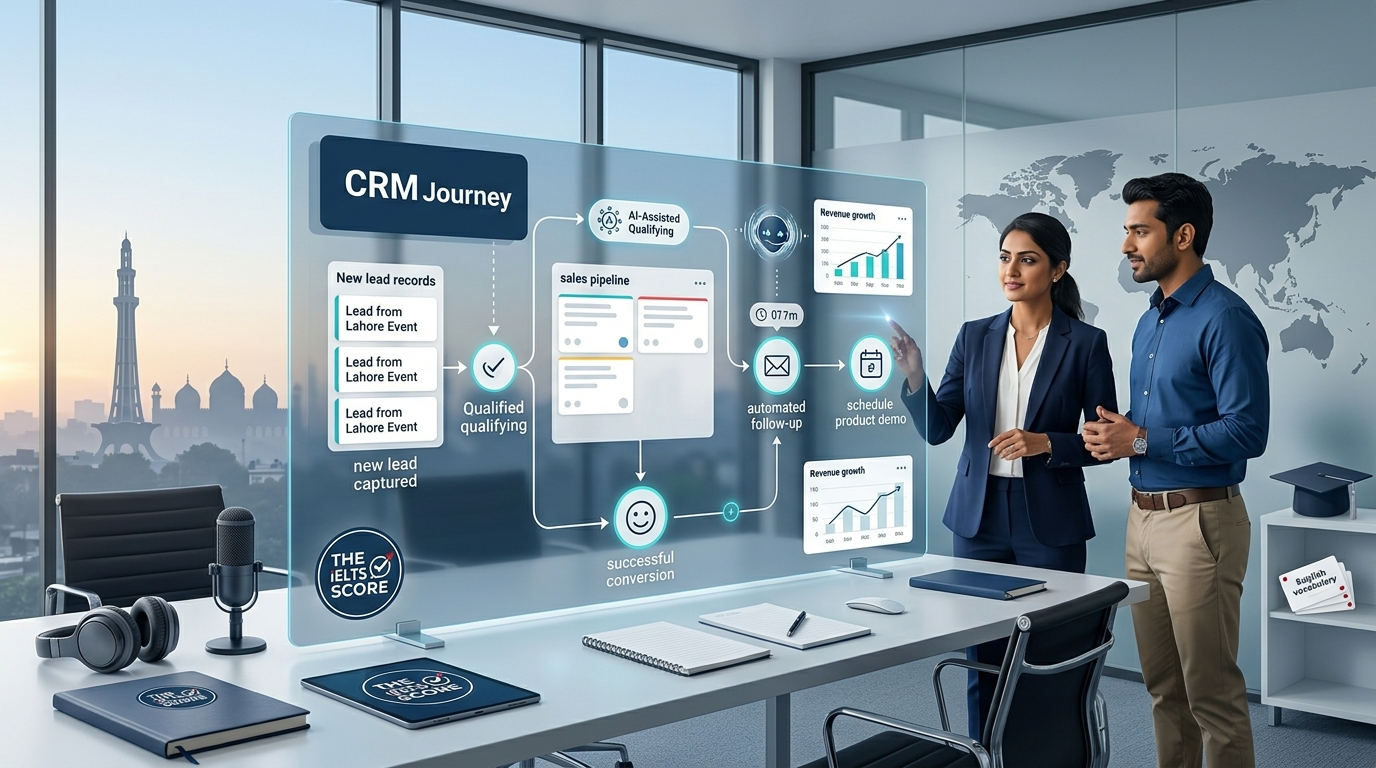
Many consider CRM automation a challenging technological task that requires costly software, specialized expertise, and intricate procedures.
After nearly six years of involvement directly with CRM automation services at the agency level, I have seen my perspective evolve.
I have worked with significant CRM platforms such as HubSpot, Salesforce, and Zoho, and I have seen companies face the same problems repeatedly. Data duplication, slow follow-ups, and poor pipeline management.
The most significant lesson I have learned is plain and simple.
Never give up on any of your leads. One of the procedures that makes a business profitable is your ability to capture, follow up with, and convert those leads.
Automating repetitive administrative tasks is just one component of CRM automation. When applied correctly, it can help businesses respond faster, protect leads, maintain cleaner customer data, improve pipeline visibility, and build a more reliable lead-to-customer chain.
What Is CRM Automation?
CRM automation is the process of automating recurring customer interactions with clients and sales processes inside a customer relationship management system, using software, rules, integrations, and increasingly artificial intelligence.
A CRM can automatically start operations based on specific incidents, saving staff from having to manually finish every step.
When a client fills a form on a website, for instance, an automated CRM workflow can:
- Make a fresh lead
- Save the lead information
- Send the lead to the right salesperson
- Deliver a quick response
- Tell the sales crew
- Prepare your follow-up actions
- Continue with the appropriate pipeline step by step for the lead.
- Maintain a record of interactions
- Conduct additional follow-ups
- Improve analytics and reporting
Eliminating humans from the sales process is not the objective.
The aim is to guarantee that crucial possibilities do not disappear, because somebody failed to update the pipeline, entered information incorrectly, or forgot to follow up.
Why CRM Automation Matters More Than Ever
The way companies get clients has changed
Prospective clients may be in touch with multiple companies in a matter of minutes. They might call different vendors to send messages across social media, submit forms to different websites, or request quotes.
This results in a straightforward and competitive reality.
Your competition may seize the chance before your salesman even sees the leads, while your company takes hours to respond, while they do instantly.
This perspective makes me believe that CRM automation represents a competitive advantage rather than just a technical enhancement.
This is something that even small companies should take seriously.
My recommendation for small businesses is simple: even though your company may be small, your competitors are clever and can attract clients during aggressive business times.
The Three CRM Issues I See Most Frequently.
Three issues consistently come up after years of agency-level experience.
Slow Follow-Ups
If a team does not contact a lead promptly, they soon risk turning it into a lost opportunity.
Salespeople have a lot going on. They might be managing current clients, going to meetings, taking calls, creating quotes, or handling operational problems.
While the sales team receives updates, a CRM automation system ensures that a new lead gets a quick response.
This creates a huge, relatable customer service experience
Poor Pipeline Management
The goal of CRM is to display where prospects are in the sales process.
However, the pipeline may become incorrect if sales staff fail to regularly update records.
Automation can assist in maintaining a more organized sales process by creating tasks, assigning leads, updating stages, and setting reminders.
Better visibility for management and salespeople is the outcome.
Data Duplication
Inconsistent or duplicate data might lead to major issues.
The CRM may show the same customer more than once. Different personnel might enter information inconsistently, and the old records may remain outdated. There could be missing important fields. Inadequate data can ultimately result in poor choices. For this reason, appropriate data hygiene should always accompany CRM automation
CRM Automation Offers More Than Just Time Saving
Evaluating CRM automation just in terms of saved employee hours is one of the biggest mistakes companies make.
Although time saving is important, this is not the whole picture
Revenue is a greater opportunity.
Think about a company that receives 500 leads.
Some leads might not receive a quick response if the company’s follow-up process is inconsistent. Different personnel might enter information inconsistently, and they may not update the old records.
Although all 500 leads may theoretically be in the CRM, the company could not be efficiently pursuing all 500 prospects.
Automation can help develop a system for capturing, organizing, following up with, and advancing leads toward conversion.
That is far better than just doing a few manual tasks.
The Most Important CRM Automation Workflow
In my opinion, the most important CRM automation workflow for many businesses is remarkably simple:
Lead capture → Follow-up → Conversion
It does not necessarily require hundreds of complex integrations.
Step 1: Lead Capture
This is the highest priority to ensure accurate lead entry into the CRM
Leads can come from:
- Forms on website
- Pages that land
- Social media
- Sponsored advertising
- Making Phone Calls
- Systems of chat
- Online reservation platforms
- Additional Outlets of marketing
The CRM ought to develop into a dependable hub for handling these opportunities.
Step 2: Immediate Follow-Up
The right follow-up strategy should begin as soon as a lead enters the CRM.
The business model determines the precise workflow, but the general idea is the same: do not let important leads go neglected
Step 3: Conversion
The end goal is more than just gathering leads.
Its purpose is to turn leads into qualified clients.
Instead of leaving conversion up to chance, try to create a measurable sales process.
An Actual Case Study of CRM Automation in the HVAC Sector
An HVAC company was the subject of one of my real-world CRM automation experiments.
Data leakage was the main problem.
The company used Salesforce, but the issue extended beyond just a lack of data; it involved how the business handled and safeguarded that data.
The team implemented CRM automation to streamline processes and reduce the risk of data leakage.
My evaluation of the project gave a score of roughly nine out of ten.
I discovered how CRM automation may solve operational issues that have a direct impact on business performance.
A CRM should do more than just keep track of customers.
It should assist the company in handling those records from the first point of contact through sales and customer service.
CRM Automation Using HubSpot, Zoho, and Salesforce
Salesforce, HubSpot, and Zoho are the three main CRM platforms that I have worked with during my agency-level experience.
Every platform has a distinct ecosystem, best use cases, characteristics, and capabilities.
Salesforce Automation
It is highly efficient for businesses with complex operations and sophisticated sales procedures.
Its adaptability allows the creation of highly customized workflows, integrations, reporting systems, and customer journeys.
HubSpot Automation
This tool delivers a robust set of CRM, marketing, sales, and customer management features.
HubSpot can be an attractive option for businesses looking for a more integrated strategy for marketing and sales automation.
Businesses can use their automation to link marketing initiatives with customer service and sales follow-ups.
Zoho Automation
It offers a wide range of business applications.
Its adaptability allows the creation of highly customized workflows, integrations, reporting systems, and customer journeys.
The key point is that there is no CRM that is perfect for everyone.
CRM Automation Does not Have to be Expensive
One typical mistake I came across is that CRM automation is always costly.
Another is that it’s hard technically.
Both fears can be justified, especially when companies observe complex enterprise installations.
However, CRM automation does not have to start with big initiatives.
A firm might start with a relatively basic workflow.
For example:
New lead → CRM record → instant response → salesperson notification → follow-up task
A major operational issue can be resolved with that only.
Additional automation can be added when there is a definite business benefit once the basic workflow operates effectively.
Instead of trying maximum automation, the goal should be helpful automation.
The Biggest CRM Automation Mistake: Overcomplication
Finding the most significant bottlenecks first is a preferable strategy.
Ask:
- Where are lost leads going?
- Where are the delays in follow-ups occurring?
- Where is the duplication of data occurring?
- Where do workers carry out tedious tasks?
- Where does information vanish between departments?
- Where do errors occur in the sales pipeline?
Then automate those particular procedures.
Good Automation can be Ruined by Poor Data Hygiene
Automation depends on the data.
For this purpose, data hygiene needs to be considered an important component of CRM automation.
Businesses should establish processes for:
- Eliminating duplicate files
- Standardizing key areas
- Keeping correct contact details
- Specifying the steps of a pipeline
- Setting guidelines of ownership
- Reviving out-of-date records
- Managing the input of data
- Identifying errors in automation
Even with advanced automation systems, poor data is still poor.
AI Is Changing CRM Automation
CRM automation is advanced by artificial intelligence.
Conventional automation frequently follows established rules.
For example:
If a lead submits a form, send an email.
AI can support multiple jobs simultaneously, analyze conversations, categorize leads, summarize interactions, generate responses, identify patterns, and assist sales professionals.
Speed, in my opinion, is one of the main benefits.
While a human salesperson has limited time and attention, an AI system may be able to process and react to several conversations at a time.
That does not imply that humans are no longer significant.
In difficult sales, negotiation, critical customer situations, and strategic decision-making, human judgement is still important.
AI, speed, and scalability can be combined with human judgement and interpersonal skills.
CRM Automation and AI Can Work Together
This is an example of a CRM workflow that is future-focused:
Lead enters CRM → AI analyzes lead → lead is scored → CRM assigns priority → AI sends personalized response → sales representative is notified → follow-up is automated → conversation is summarized → pipeline is updated → management receives reporting
The sales team can focus on higher-value tasks by using this kind of system, which may reduce the amount of manual administration they must perform.
The objective of the company would not alter even though the technology will continue to advance:
Without allowing significant leads to fall through the gaps, convert more qualified opportunities
CRM Automation for Small Businesses
Sometimes, small businesses feel that CRM automation is only ideal for big companies.
I disagree.
Because a small company usually has fewer people and resources, it may gain more from automation.
Manual follow-up may quickly increase the burden when a single salesman is responsible for multiple leads.
Without the requirement of a sizable sales department, automation can provide structure.
A small business may start with:
- Lead capturing through automation
- Lead acknowledgement in real time
- Taking the lead in the assignment
- Reminders to follow up
- Schedule an appointment
- Updates to the pipeline
- Notification from clients
- Basic reports
After that, the system may grow the organization.
How to Effectively Implement CRM Automation
The business process, not the software, is the place where successful CRM automation originates.
“What challenges are we trying to resolve?”
Track The Current Workflow
Document the process of generating leads and turning them into clients
Analyze every critical stage and transition
Make all the data clean
Make sure the CRM data is accurate before building complex automation.
First Automate the Most Important Steps
Start with the steps that affect revenue or operational efficiency most.
Before expanding, test
Apply a real-world scenario to evaluate the workflow.
Measure the Results
CRM automation should be measurable.
Check metrics like:
- Lead time for response
- Conversion rate of leads
- Rate of booking appointments
- Velocity in sales pipeline
- Completion of the follow-up
- Cost of gaining clients
- Earning received
- Time saved
Then, based on actual performance, optimize the workflow.
CRM Automation Should Benefit People, Not Just Technology
It is very simple to think that automation means removing humans from the whole process.
I do not perceive it as such.
Automation serves to prevent unwanted complexity.
It should not be essential for an agent or salesperson to manually move lead information through platforms.
It should not be mandatory for a manager to manually determine which leads required to be followed up with.
An enterprise should not lose an order only because a reminder was not delivered.
While people emphasize connectivity, negotiation, strategy, problem solving, and closing, automation can handle recurring tasks throughout.
Things Companies Must Avoid
According to my experience, I would recommend companies avoid several common mistakes
Avoid Automating the Broken Process
The old automation process can create problems in the whole process if it is basically wrong to execute.
Fix the process first.
Do Not Create a Complex System for Its Own Sake
Better automation does not follow more automation every time.
Construct what the business truly wants to get better results.
Do Not Underestimate Data Quality
The CRM system may be compromised by poor data hygiene.
Do Not Forget the Customer Behavior and Experience
Instead of making communication robotic and irritating, accurate and systematic automation could make it helpful and timely.
Do Not Measure Automation Just by Time Saved
Whether automation enhances corporate performance should be the final question
CRM Automation’s Future
CRM automation is moving toward increasingly intelligent systems.
The majority of CRM automation in the past was rule-based
The next generation will combine:
- CRM systems
- Artificial intelligence
- AI agents
- Workflow automation
- Analytical predictions
- Marketing automation
- Sales automation
- Automation of customer service
- Business intelligence
This could allow businesses to build systems that respond to customers, qualify opportunities, update records, assist sales teams, and coordinate workflows with far less manual intervention.
But technology alone will not create the result.
The business still needs a clear strategy and planning, clean data, well-defined processes, and refined human oversight.
Final Thoughts on CRM Automation
After six years of agency-level experience, my view is that CRM automation should not be treated as a luxury or simply another software investment.
It should be treated as part of the revenue engine.
Businesses invest heavily in generating leads through advertising, SEO, social media, referrals, websites, and other channels.
It makes little sense to spend money acquiring those leads and then compromise the opportunity through slow follow-ups, poor pipeline management, or inaccurate data. Therefore, my philosophy is simple.
Do not take a risk on your leads.
Document them accurately.
Respond promptly.
Oversee them in an organized manner.
Transform them reliably.
CRM automation can help organizations systematically develop that process.
The objective is not to develop the most intricate automation system available. The purpose is to establish a dependable system that enables the business to seize more conversion opportunities, react more swiftly, oversee its pipeline more efficiently, and ultimately increase profitability. For your CRM automation services, book your appointment at Blue Pixel Edge.
About the Author
Sajid Abbas | Marketing and Sales | AI Automation & CRM Specialist for US B2B | Web Design, Lead Generation
I help US SMBs transform their digital presence through AI automation, CRM optimization, web design, and lead generation. With experience serving businesses across multiple industries, I specialize in turning fragmented digital tools into unified revenue engines.